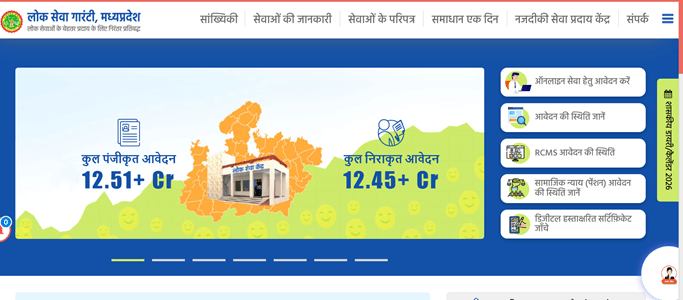
MP e-District is an online citizen service platform of the Madhya Pradesh government that helps residents access several government services without repeatedly visiting district offices. The e-District project is designed to connect different departments and make services available through the internet, Lok Seva Kendras, Common Service Centres and MPOnline kiosks. Citizens can use the portal for services such as caste, income, residence and other certificates, depending on the service currently available online.
The official MP e-District portal can be accessed through mpedistrict.gov.in. Madhya Pradesh district administration websites also direct citizens to this portal for online certificates and e-District services.
What Services Are Available on MP e-District?
MP e-District brings a number of district-level government services onto a common digital platform. The exact services available can vary according to the department and type of application.
Some commonly available services include:
- Caste certificate
- Income certificate
- Residence or domicile certificate
- Solvency certificate
- Birth and death-related services
- Marriage-related services
- Land and revenue-related services
- Social security services
- Selected licences, permissions and departmental certificates
The National Government Services Portal specifically lists online registration for caste, income, residence and solvency certificates among Madhya Pradesh e-District services.
MP e-District Registration Process
New users may need to create a citizen account before applying for certain services online.
Visit the official MP e-District website and look for the citizen registration or new-user option. Enter the requested personal details carefully. Depending on the current registration form, these can include your name, date of birth, gender, parents’ details, mobile number and other identification information.
Provide an active mobile number because OTP verification, application updates or other communication may be sent to it. Create the required login credentials and complete the verification process shown on the portal.
After successful registration, keep your registered mobile number and login details secure. They may be required when you return to check applications or access available citizen services.
How to Login to MP e-District
Existing users can access their account from the citizen login section of the MP e-District portal.
Open mpedistrict.gov.in and select the appropriate login option. Enter your registered credentials and complete the captcha or OTP verification if requested.
After login, the dashboard generally provides access to available services, submitted applications and other citizen-related options.
If you cannot log in, first check that the details have been entered correctly. Use the password recovery option available on the portal rather than repeatedly trying incorrect passwords.
How to Apply for a Certificate Online
After logging in, find the relevant service or department and select the certificate for which you want to apply.
Read the eligibility conditions and document requirements before filling in the form. Enter the applicant’s personal, family, address and other service-specific details carefully.
Upload the required documents in the prescribed format. Documents may differ from one service to another, so applicants should rely on the document list displayed for the selected service rather than assuming the same documents are needed for every certificate.
Check the complete form before submission. Incorrect spelling of names, wrong addresses or mismatched details can delay processing.
Submit the application and complete any applicable online payment, if required for that particular service. Once the application is successfully submitted, save the acknowledgement or application reference number.
This number is particularly important for tracking the application later.
How to Check MP e-District Application Status
Citizens do not normally need to visit the concerned government office simply to find out whether an online application has been processed.
Go to the MP e-District portal and locate the application status or tracking option. Enter the application, registration or reference number mentioned on your acknowledgement receipt. Complete any verification requested on the page and submit it.
The portal may display a status such as submitted, under process, approved, rejected or delivered, depending on the stage of the application.
Registered users may also be able to view submitted applications after logging into their citizen account.
If an application remains pending, check whether the portal shows any objection, document requirement or action that needs to be completed by the applicant.
How to Download a Certificate from MP e-District
Once an application is approved and the digitally issued certificate becomes available, it can generally be accessed through the relevant certificate or application section of the portal.
Login to your account and open your submitted or completed applications. Select the approved application and look for the certificate download, view certificate or print option.
If the portal provides certificate access through a public verification or download facility, enter the required application or certificate details there.
Download the certificate in PDF format and save a copy on your device. You can also print it whenever a physical copy is required.
Government district websites confirm that MP e-District is used for obtaining online certificates, while citizen services are also delivered through Lok Seva Kendras, CSCs and MPOnline kiosks.
What to Do If the Portal Is Not Working
Temporary loading problems can occur because of heavy traffic, maintenance or browser issues. Refresh the page after some time and try again using an updated browser.
Clear the browser cache if pages are not opening correctly. Also make sure pop-ups and PDF downloads are not being blocked when trying to open a certificate.
Avoid using unofficial websites that ask for unnecessary personal information or payment. For e-District services, use the official Madhya Pradesh government portal or an authorised Lok Seva Kendra, CSC or MPOnline kiosk.
FAQs About MP e-District
Q. Can I use MP e-District without visiting a Lok Seva Kendra?
Many services can be accessed online directly by citizens. However, if a particular service cannot be completed online or you need assistance with documents and submission, an authorised Lok Seva Kendra, CSC or MPOnline kiosk can help.
Q. What should I do if I lose my application number?
First check the acknowledgement receipt, downloaded application copy or any SMS received after submission. Registered users should also check their portal account for previously submitted applications.
Q. Does every MP e-District certificate require a fee?
Not necessarily. Fees depend on the particular service and the method through which the application is submitted. Always check the amount displayed for the selected service before making payment.
Q. Can someone else use my downloaded certificate?
A certificate is issued for the person named on it. Downloading or printing the document does not transfer it to another person. Authorities may also verify its digital or application details when required.
Q. Why is my certificate not available even though the application is approved?
The certificate file may take additional time to appear after approval, or the final digitally signed document may still be under generation. Check the portal again and confirm whether the status has moved to delivered or certificate issued.
Q. Can I correct an error after submitting an MP e-District application?
Correction options depend on the service and current application stage. If online editing is unavailable, contact the concerned department or authorised Lok Seva Kendra before submitting a fresh application.