e-District Assam is part of the Government of Assam’s online public service delivery system. It was created to make district-level government services available electronically through the internet, Common Service Centres and Public Facilitation Centres. Citizens can use the system for services such as income, caste, permanent resident, senior citizen and other certificates without repeatedly visiting government offices.
Assam has since brought government services under Sewa Setu, which is now the state’s unified citizen-service platform. The earlier Right to Public Services portal was officially renamed Sewa Setu in January 2023. The original Assam e-District portal, however, remains available for functions such as checking older e-District applications and viewing approved certificates.
- Official Sewa Setu Portal: https://sewasetu.assam.gov.in/
- Official Assam e-District Portal: https://edistrict.assam.gov.in/
e-District Assam and Sewa Setu: Which Portal Should You Use?
Citizens may come across both websites when searching for Assam government certificates.
For most new online government service applications, Sewa Setu is the important portal to use. The Assam government describes it as the single unified interface for services provided by state administrative departments.
The older e-District website is still useful for:
- Checking an e-District application using its application number
- Viewing an approved certificate using its certificate number
- Accessing e-District support information
- Checking supporting-document information
- Recovering an e-District login password
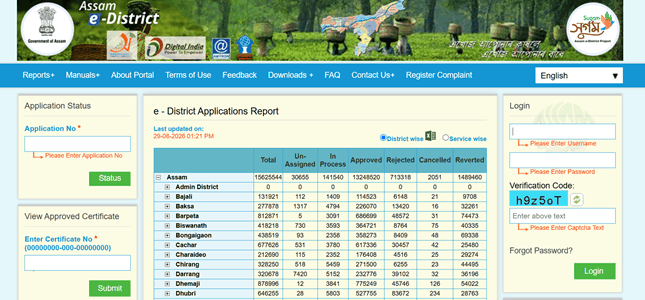
The current e-District homepage continues to display both Application Status and View Approved Certificate facilities.
Services Available Through e-District Assam
Services can vary according to the department and current availability. Common district-level services have included:
- Income Certificate
- Caste Certificate
- Non-Creamy Layer Certificate
- Permanent Resident Certificate for higher education
- Senior Citizen Certificate
- Next of Kin Certificate
- Permission for delayed birth registration
- Permission for delayed death registration
- Bakijai Clearance Certificate
- Certified Copy of Electoral Roll
- Permissions related to certain public events
- Other Revenue and district administration services
Assam district administration information confirms that such services have been delivered electronically through e-District, CSCs and Public Facilitation Centres.
Sewa Setu now provides a much wider collection of government services from different departments.
How to Register on Sewa Setu Assam
First-time applicants generally need to create a Sewa Setu account before submitting an online application.
Follow these steps:
- Open assam.gov.in.
- Click the Register
- Enter your full name.
- Provide an active mobile number.
- Enter your email address if requested. For some services, email may be optional.
- Select your state.
- Create a password.
- Complete the verification process shown on the portal.
- Submit the registration form.
- Keep your registered mobile number and login credentials safe.
Official Assam service guidance states that first-time Sewa Setu users register using basic information such as full name, mobile number, email, state and password.
Always use your own mobile number because OTPs, application updates and service-completion messages may be sent to it.
How to Login to Sewa Setu
Once registration is complete, you can access online services using the account you created.
- Visit assam.gov.in.
- Click Login.
- Enter your registered credentials.
- Complete the captcha or OTP verification if displayed.
- Sign in to your account.
- Open the available services section.
- Search for the certificate or government service you need.
If you are looking for an older application submitted through the original e-District system, use edistrict.assam.gov.in instead.
How to Apply for a Certificate Online
The application procedure varies slightly between services, but the basic Sewa Setu process is similar.
- Login to your Sewa Setu account.
- Select Apply Online or search for the required service.
- Open the service page.
- Read the eligibility conditions and Requirements
- Click the application button.
- Enter the applicant’s personal and service-specific details.
- Upload the documents requested for that service.
- Review the entire form carefully.
- Pay the prescribed fee, if applicable.
- Complete the final submission.
- Save the acknowledgement.
- Note the application reference number.
Assam government service instructions confirm that an acknowledgement containing the application reference number is generated after successful submission and payment for applicable services. Updates can also be sent by SMS and email.
Documents Commonly Required
There is no single document list for every Assam e-District or Sewa Setu application. Requirements depend on the service.
Applicants may commonly need:
- Aadhaar or another accepted identity proof
- Address proof
- Passport-size photograph
- Birth certificate
- Educational records
- Existing caste or family certificates
- Income-related documents
- Land records
- Supporting declarations
- Other documents mentioned in the service requirements
Upload clear and readable copies. A document that is incomplete, blurred or inconsistent with the application details can delay processing.
How to Check e-District Assam Application Status
For an application associated with the older e-District system, status checking is available directly on the homepage.
Follow these steps:
- Open assam.gov.in.
- Find Application Status.
- Enter your application number.
- Click Status.
- Check the current stage of your application.
The official portal currently provides this facility without requiring users to search through multiple sections.
For applications submitted through Sewa Setu, login to your Sewa Setu account and check the relevant application or tracking section using the reference number generated after submission.
How to Download an Approved Certificate
When a service is completed, the certificate or final document may be made available electronically.
For a Sewa Setu application:
- Login to your Sewa Setu account.
- Open your submitted applications.
- Select the completed application.
- Check whether the certificate has been issued.
- Click the available download option.
- Save the certificate on your phone or computer.
- Print it if a physical copy is required.
Government guidance for Sewa Setu services confirms that applicants can be notified by SMS or email once a service is completed and can download the resulting document online.
For older e-District certificates:
- Visit assam.gov.in.
- Find View Approved Certificate.
- Enter the certificate number in the required format.
- Submit the information.
- Open the approved certificate.
- Save or print the document.
The official e-District portal currently provides a dedicated certificate-number field for viewing approved certificates.
Applying Through CSC or Public Facilitation Centre
Citizens who cannot complete an online application themselves can use an authorised Common Service Centre or Public Facilitation Centre.
Assam’s e-District system was designed to make services available through CSCs as well as Public Facilitation Centres located at district, subdivision and circle levels.
When visiting a centre:
- Carry original supporting documents.
- Take photocopies if necessary.
- Keep your mobile phone available for OTP verification.
- Check the information entered by the operator.
- Collect the acknowledgement after submission.
- Keep the application reference number safely.
Assam e-District Helpdesk
Users facing problems with the older e-District portal can contact its official support facility.
Toll-Free Helpdesk: 1-800-345-1100
Phone: 0361-2724222
These numbers are currently displayed on the Assam e-District portal.
FAQs About e-District Assam
Q. Why am I being directed to Sewa Setu instead of the old e-District portal?
Assam has made Sewa Setu the unified interface for government services. New services are increasingly accessed through Sewa Setu, while the older e-District portal continues to provide certain legacy functions such as application-status and approved-certificate lookup.
Q. What should I do if I lose my e-District password?
The e-District portal has a Forgot Password facility. It asks for information including the username and registered email ID to begin the recovery process.
Q. Can I verify whether an Assam e-District certificate is genuine?
Approved e-District certificates are digitally issued and can be verified online. Assam district administration guidance specifically states that e-District certificates are digitally signed and can be verified electronically.
Q. What should I do if the application is returned or reverted?
Read the reason shown against the application carefully. A reverted application may require additional information, a corrected document or another action from the applicant. Complete the requested correction rather than immediately filing a duplicate application.
Q. Is an application reference number the same as a certificate number?
No. The application reference number identifies the submitted application and is mainly used for tracking. A certificate number identifies the final certificate after it has been issued.
Q. Can I apply from home without using a CSC?
Yes. Services available for direct online application can be accessed through Sewa Setu using an internet-connected phone or computer. CSCs and facilitation centres remain useful for citizens who need assistance with forms, document scanning or online submission.