e-District UP is the Government of Uttar Pradesh’s online system for delivering certificates and other citizen services digitally. It brings services from different government departments onto a common platform so residents do not have to visit several offices for routine applications. The system has been implemented across all 75 districts of Uttar Pradesh and is technically coordinated by the National Informatics Centre, Uttar Pradesh.
For citizens applying directly online, eSathi acts as the citizen-facing portal of the e-District system. A registered citizen can apply for eligible services through eSathi and, after the application is disposed of, download the certificate or disposal letter from the same account.
Official UP e-District Portal: https://edistrict.up.gov.in/edistrictup/
Official eSathi Citizen Portal: https://esathi.up.gov.in/citizenservices/login/login.aspx
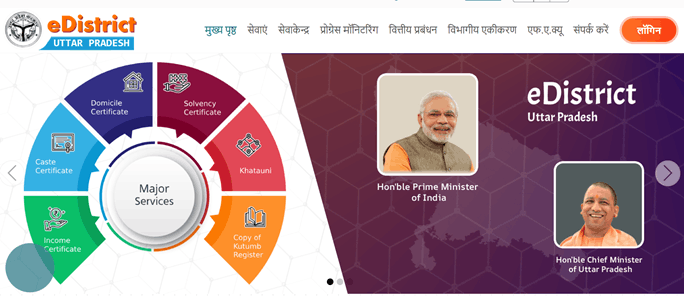
e-District UP and eSathi: What Is the Difference?
The two names are closely connected.
e-District UP is the main government platform through which departments process and deliver citizen services. eSathi is the online citizen interface that allows individuals to register and apply for many e-District services themselves.
People can therefore use eSathi when they want to apply from home. Those who need assistance can use an authorised Common Service Centre or Jan Seva Kendra.
The Uttar Pradesh e-District system is also integrated with DigiLocker for electronic certificate delivery and verification-related use.
What Services Are Available on e-District UP?
A large number of services from different government departments are connected with the e-District platform. Important certificate and Revenue-related services include:
- Income Certificate
- Caste Certificate
- Domicile or Residence Certificate
- Solvency Certificate
- Disability Certificate
- Copy of Khatauni
- Copy of Family Register
- Birth and Death-related services
- Public Address System permission
- Certain farmer relief and assistance services
- Other departmental certificates, approvals and citizen services
NIC Uttar Pradesh lists Income, Domicile, Caste, Solvency and Disability certificates among the major services available through e-District.
The exact service list may change, so applicants should check the current portal before starting an application.
How to Register on eSathi UP
Citizen registration is required to apply for e-District services directly through eSathi. The Uttar Pradesh government specifically states that registration is mandatory for citizens using this online facility.
Follow these steps:
- Open the official eSathi portal.
- Click the New User Registration or citizen-registration option.
- Create the requested User ID.
- Enter your full name.
- Provide your date of birth and other personal information.
- Enter your complete address.
- Select your district where required.
- Provide an active mobile number.
- Enter a valid email address if requested.
- Create or receive the password as instructed by the portal.
- Complete the captcha or OTP verification.
- Submit the registration form.
- Keep your User ID, password and registered mobile number safely.
Always enter a mobile number you actively use because application-related messages and account information may be sent to it.
How to Login to eSathi UP
Once registration has been completed, you can access the available citizen services.
Follow these steps:
- Visit up.gov.in.
- Open the citizen login page.
- Enter your registered User ID.
- Enter your password.
- Type the security or captcha code displayed on the page.
- Click Login.
- Open the eSathi services section.
- Select the department or certificate you need.
If you forget your password, use the password-recovery option rather than creating another account immediately.
How to Apply for a Certificate Online
The documents and form fields differ according to the certificate, but the basic online process is similar.
Follow these steps:
- Login to your eSathi account.
- Open the integrated e-District services section.
- Select the relevant department.
- Choose the required certificate.
- Read the eligibility conditions and instructions.
- Enter the applicant’s personal details.
- Fill in address, family, income or other service-specific information.
- Upload the required supporting documents.
- Check the uploaded files to make sure they are clear.
- Review the complete application.
- Pay the prescribed online service charge, where applicable.
- Submit the application.
- Download or print the acknowledgement.
- Keep the application number safely.
The application is then processed by the concerned department. Some certificates may require field-level or Revenue Department verification before approval.
Documents Commonly Required
There is no single document list for every UP e-District service. Depending on the certificate, applicants may need:
- Aadhaar or another identity proof
- Passport-size photograph
- Residence proof
- Ration card or family details
- Self-declaration
- Gram Pradhan or Ward Councillor certificate
- Income-related documents
- Existing caste or family certificate
- Land or Khatauni records
- Birth or educational records
- Other supporting documents required for the selected service
Applicants should check the document list displayed for the particular certificate before submission.
How to Check e-District UP Application Status
Applicants should retain their application or reference number after submitting the form.
The general tracking process is:
- Open the official e-District/eSathi portal.
- Login to your citizen account where required.
- Open your submitted applications.
- Select the relevant application.
- Check the current status.
- Review any objection or pending action displayed against it.
The status may show that the application is submitted, under verification, approved, rejected or disposed of.
If additional documents or corrections are requested, complete them according to the instructions instead of submitting a duplicate application.
How to Download an e-District UP Certificate
One of the main benefits of eSathi is that approved certificates can be downloaded online after the application has been disposed of. The Government of Uttar Pradesh specifically confirms that citizens can download their certificate or disposal letter from the same eSathi portal.
Follow these steps:
- Login to your eSathi account.
- Open your submitted or disposed applications.
- Select the approved application.
- Check whether the certificate or disposal letter is available.
- Click the download option.
- Open the digitally issued certificate.
- Save the file on your mobile phone or computer.
- Print it if a physical copy is needed.
Certificates issued through e-District are also integrated with DigiLocker, which provides another convenient way to access supported digital documents.
Applying Through a Jan Seva Kendra or CSC
Citizens who cannot complete an online application themselves can visit an authorised Common Service Centre or Jan Seva Kendra. The e-District project was specifically designed to deliver services through CSCs as well as online channels.
When visiting a centre:
- Carry the required original documents.
- Take photocopies if necessary.
- Keep your active mobile phone with you.
- Provide correct personal information.
- Check the form before final submission.
- Collect the acknowledgement receipt.
- Keep the application number safely.
e-District UP Helpdesk
For eSathi-related assistance, official Uttar Pradesh government pages currently list:
- Helpdesk Phone: 0522-2304706
- Email: ceghelpdesk@gmail.com
The helpdesk is associated with the Centre for e-Governance in Lucknow.
FAQs About e-District UP
Q. Can I use eSathi without creating an account?
No. The official eSathi information states that citizen registration is mandatory for applying for e-District services through the citizen portal.
Q. Can I get my UP e-District certificate through DigiLocker?
Supported e-District certificates are integrated with DigiLocker. If the particular certificate is available in your DigiLocker account, it can be accessed there after issuance.
Q. What should I do if the spelling on my application is wrong?
Correct the information before final submission whenever possible. If the application has already been submitted, check whether the portal provides a correction or objection-response option. Otherwise, contact the concerned office before filing another application.
Q. Why is my application still under verification?
Some certificates require verification by Revenue officials or other competent authorities. Online submission starts the process but does not remove departmental verification requirements.
Q. Can I apply from another district if my permanent address is elsewhere in Uttar Pradesh?
You can access the online portal from anywhere, but the competent authority and supporting documents normally depend on the address and jurisdiction connected with the particular service.
Q. What should I do if my certificate is approved but I cannot download it?
First check the disposed or completed applications section in eSathi and then check DigiLocker where applicable. If the certificate still does not appear, contact the eSathi helpdesk with your application number and registered details.