e-District West Bengal is the Government of West Bengal’s online single-window platform for providing citizen services, certificates, licences, approvals and other departmental services through a digital system. The upgraded platform is known as WB e-District 2.0 and brings district, departmental and development-authority services onto one portal.
Citizens can create an account, apply for available services, upload supporting documents, make applicable payments, track applications and download approved certificates from the portal. The system is maintained under the Personnel & Administrative Reforms Department of the Government of West Bengal.
Official WB e-District Portal: https://edistrict.wb.gov.in/
WB e-District 2.0 Portal: https://edistrict.wb.gov.in/portal/
What Is WB e-District 2.0?
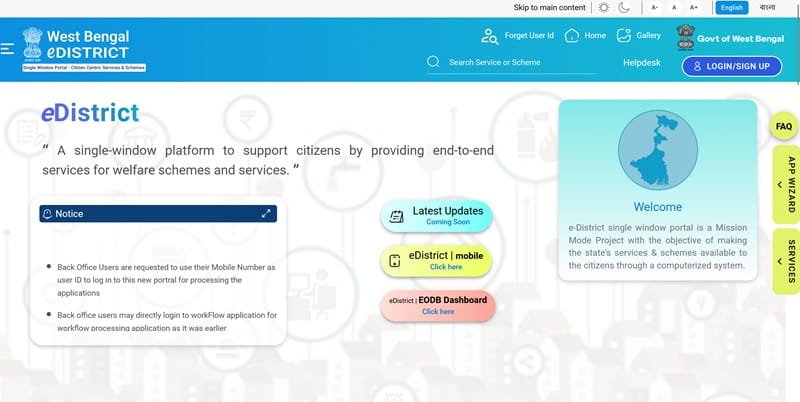
WB e-District 2.0 is the newer version of the state’s e-District system. The official portal states that district and departmental services, along with services of development authorities that were available on the old portal, have been brought onto the new platform.
The portal currently acts as a single window where users can search for available services and schemes. It also provides access to facilities such as:
- Citizen registration and login
- Online service applications
- Application acknowledgement
- Online payment for applicable services
- Application tracking
- Downloading approved certificates
- Third-party certificate verification
- Helpdesk and grievance facilities
What Services Are Available on e-District West Bengal?
WB e-District covers services belonging to different state departments and authorities. The exact list can change as services are added or shifted to specialised portals.
Some services available through or associated with the e-District system include:
- Ordinary Residential Certificate
- Certified Copy of Registered Deed
- Trade Licence-related services
- Fire Safety Certificate
- Fire Licence
- Electrical Supervisor Licence
- Workman’s Permit
- Contractor Licence
- Lift and escalator-related permissions
- Registration of firms and societies
- Various licences, approvals and No Objection Certificates
- Services of district administrations and development authorities
The West Bengal government also separately provides online access to services such as domicile, caste and income certificates through its wider e-services network.
Applicants should search the current e-District service directory before starting an application because some services may redirect to another official departmental website.
How to Register on WB e-District
Registration is required before a citizen can apply for most services. Official e-District user manuals state that users who wish to avail themselves of available schemes or services must register on the portal.
Follow these steps:
- Visit wb.gov.in/portal/.
- Click Login/Sign Up.
- Select the registration option for a new user.
- Enter your first name and last name.
- Provide a valid email address.
- Enter an active mobile number.
- Enter your date of birth.
- Create or enter the requested username.
- Complete mobile-number verification using the OTP sent by SMS.
- Submit the registration form.
- Keep your username and registered mobile number safely.
The registration interface used by WB e-District 2.0 supports OTP-based mobile verification.
How to Login to WB e-District
Once registration is complete, users can login to their dashboard and access available services.
Follow these steps:
- Open the WB e-District 2.0 portal.
- Click Login.
- Enter your registered username or other login credential requested.
- Enter your password.
- Complete OTP or security verification if prompted.
- Click the login button.
- Open your dashboard.
- Search for the required service.
The portal also notes that users of the old e-District system may continue to use their existing user ID. If an old user ID does not work in certain cases, the registered mobile number may be used as instructed by the portal.
How to Apply for a Service Online
The exact application form depends on the service, but the overall procedure is similar.
Follow these steps:
- Login to the WB e-District portal.
- Use the search bar or Services
- Select the required service.
- Read the eligibility conditions and instructions.
- Click the application option.
- Fill in the applicant’s personal details.
- Enter service-specific information.
- Upload the required supporting documents.
- Check all entries carefully.
- Make the online payment if the service has a fee.
- Submit the application.
- Download or print the acknowledgement.
- Note the Application Identification Number, commonly called AIN.
For services such as trade licence applications, the West Bengal government confirms that an AIN is generated after submission and can subsequently be used for tracking.
Documents Commonly Required
There is no single document list for every WB e-District service. Depending on the application, users may be asked for:
- Aadhaar or another identity proof
- Address proof
- Passport-size photograph
- Date-of-birth proof
- Property or land documents
- Registered deed
- Trade or business-related documents
- Existing licences or certificates
- Affidavit or declaration
- Educational or professional qualifications
- Department-specific supporting documents
Always use the document checklist displayed for the selected service rather than uploading unnecessary files.
How to Check WB e-District Application Status
Submitted applications can be checked through the user dashboard.
Follow these steps:
- Login to the WB e-District portal.
- Open your dashboard.
- Locate the application-search section.
- Enter your unique AIN.
- Search for the application.
- Check the status displayed against it.
Depending on the stage, the application may appear as draft, submitted, approved, rejected or pending action.
Official e-District manuals confirm that applications can be searched using the unique AIN and that applicants can see whether the final outcome is approved or rejected.
How to Download a WB e-District Certificate
Once an application has been approved and the final certificate has been generated, it can be downloaded from the applicant’s dashboard.
Follow these steps:
- Login to WB e-District.
- Search for the application using its AIN.
- Confirm that the status shows Approved.
- Look under the Actions
- Click the Download Certificate
- A certificate or document list will appear.
- Click the download icon against the required document.
- Save the certificate to your device.
- Print it if a physical copy is needed.
Official WB e-District 2.0 user manuals specifically describe this procedure for downloading approved certificates.
How to Verify a WB e-District Certificate
WB e-District 2.0 also provides a third-party certificate-verification facility.
Follow these steps:
- Open the WB e-District portal.
- Open the side menu.
- Select Third Party Certificate Verification.
- Enter the certificate or application details requested.
- Submit the information.
- Check the verification result displayed by the system.
This facility is useful for employers, organisations and government offices that need to verify whether an electronically issued document is genuine.
Getting Help Through Bangla Sahayata Kendra
Citizens who are unable to complete an online application themselves can seek assistance through a Bangla Sahayata Kendra (BSK) where the relevant service is supported.
West Bengal’s BSK network provides access to hundreds of government services from multiple state departments. The current BSK service directory lists more than 300 services across around 40 departments.
When seeking assistance:
- Carry the necessary original documents.
- Keep photocopies or digital copies available.
- Carry the mobile phone linked with your application.
- Check all details entered by the operator.
- Collect the acknowledgement after submission.
- Keep the AIN safely for future tracking.
FAQs About e-District West Bengal
Q. Can an application be saved without submitting it immediately?
Yes. WB e-District 2.0 supports draft applications for services where this facility is available. Official user manuals show that draft applications can later be edited or deleted before final submission.
Q. What should I do if I lose my application acknowledgement?
Login to your dashboard and search for the application. WB e-District manuals show that applicants can download the acknowledgement again from the dashboard for supported services.
Q. Can I use my old WB e-District account on the new portal?
The official portal states that the same user ID from the old system continues to be applicable. If it does not work in the relevant login context, users may be instructed to try their registered mobile number.
Q. Why can’t I find a government service on e-District?
Not every West Bengal online service is hosted directly on e-District. Some services have moved to dedicated departmental systems such as specialised land, municipal or business portals. Check the official West Bengal e-services directory if the required service does not appear.
Q. Can I print a certificate again after downloading it once?
Yes. If the certificate remains available in your approved application, you can download the electronic copy again and print another copy whenever required.
Q. Is the AIN the same as the final certificate number?
No. The AIN identifies the application during processing. The issued certificate or approval may have its own separate registration or certificate number after approval.